
About GIMP
Homepage
FAQ
supported image formats
toolbox/feature set
screenshots
installation
Brushes
Arrow brushes
Cursor brushes
Circle brushes
Checkmark brushes
Plug-ins
Arrow generator Plug-in
SVGpage
SVGpage main
SVGpage Readme
SVGpage changelog
SVGpage download
Autotrace manual
Simple How-TOs
Common Preferences
making a line
Making Selections
rectangles + ellipses
hand-drawn
fuzzy select
select by color
paths and trickiness
selection options
Transparency
when image is created
for one color
all but a selection
layered opacity
Using Text
basic text tool
freetype plugin
Xtns>Logos
image rotation
drop shadows
controlling contrast limit colors 1
Tips N Tricks
more selections
advanced color control
colorizing techniques
layers 1
layers 2
Examples
GIMP SplashScreen
Blue Heron Moon
WPClipart collection
Fav Resources
Coming
|
Changes to be made . . . Most things are set up well, but there are several tweaks to how GIMP behaves and looks that I feel more comfortable with. I will start by showing you the Preferences screen as it appears when first opened, then start working my way through the prefs to give you some pointers. A few of them are actually important to the quality of your output. 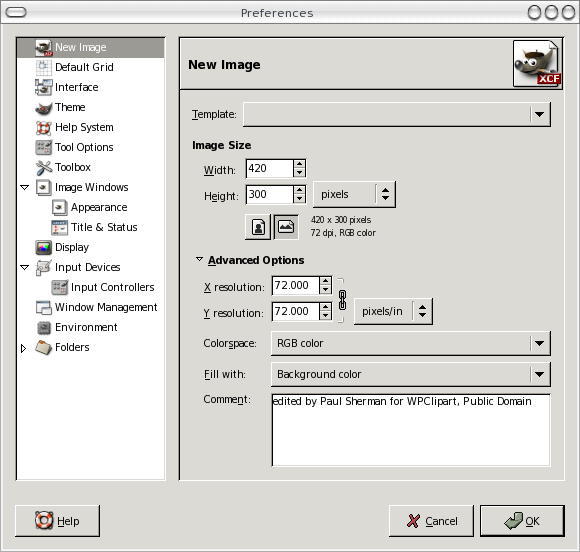
New Image Only thing I change here is the comment. Didn't used to do that either -- but if you want a comment embedded (unseen), then putting it in Prefs can be more than handy as it can actually be difficult to get into some image types later on. Another one you may find a time-saver is if you make lots of web graphics and tend to put transparent backgrounds on them. If that is the case change the "Fill With" to "transparency." The resolutio is set to 72, actually for web graphics. But since printers and documents scale everything so nicely lately, I leave it there. If you do lots of photographs and plop things nto new images, then change that to your printer's resolution. Default Grid, Interface and Theme I leave alone. Help System I change to set the Help Browser to my Web Browser. I don't use Gnome and I like HTML documentation. Change the "Web Browser to use" as well, if necessary. Tool Options This has the biggie -- default interpolation. Set it from the default of "Linear" to cubic. It is a major quality issue. Image Windows Oooh, this irks me if I do not set it . . . Resize window on zoom. It just kills me to have to scroll around looking when I do pixel-level manipulations. I end up having to unzoom a little then look again. Big waste of time. Folders Is really the only other thing I've had cause to fiddle with. If you ant to keep scripts, patterns and other stuff in your own personal directory then you have to set some of these first, so the GIMP will find them when it starts up. One "gotcha" has to do with fonts under Linux, however. I can set my /home/.fonts in the prefs but when I have fonts there GIMP does not list them, whereas other apps such as AbiWord do . . . |