
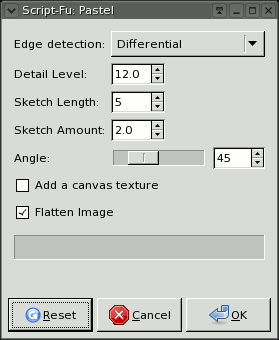
This is a an adjustable script to made an image look like it was drawn/painted in pastels. The "sketch amount" and "sketch length" can change the look and feel of results quite a bit, and since the effect can be left on a separate layer when complete (uncheck the "Flatten Image" box) you can set that layers opacity to lessen the effect if desired.
Pastel Dialog
Original Image
"the Lovers" by Pablo Picasso

Result 1:
Default Settings

layer dialog:
to adjust results of pastel script

result modified:
opacity set to 25%

Sketch lenght Modified:
sketch length increased

Sketch Amount Modified:
sketch amount increased

Original Image
"the Lovers" by Pablo Picasso
Result 1:
Default Settings
layer dialog:
to adjust results of pastel script
|
If you choose NOT to flatten the image when complete -- you can adjust the
layer opacity to tone the effect down as needed. You can choose from
the image menu: WINDOWS > DOCKABLE DIALOGS > LAYERS (or Ctrl + L) There you can set the layer opacity. In the example I drag the slider to 25% . . . the "Pastel layer" was already selected. |
result modified:
opacity set to 25%
Sketch lenght Modified:
sketch length increased
Sketch Amount Modified:
sketch amount increased