
Python-FUs, that work...
Python scripts require Python on your machine. Some scripts also require GTK. These are usually already installed on Linux boxes, and are relatively simple to download and install for Windows, nowadays.
That's the sometimes downside -- but the upside -- Oooh, La, La!
Python vs Tiny-FU (the scripting language used by all those .scm files.) It's like Granda tossed into a pool to wrestle a Great White. Why there are not hundreds of people writing plugs for GIMP in Python, I do not know. maybe they keep them for themselves?
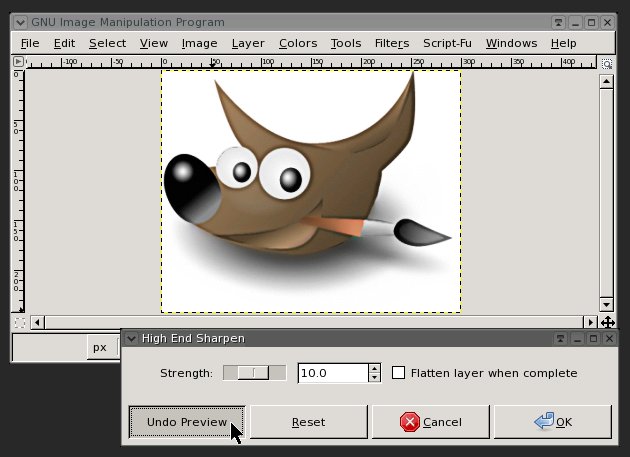
Anyway -- one of the things you can do is very easily is write batch scripts this way. I have a few of them to post up, though they are quite specialized. Another thing I was recently asked to do was come up with a preview display for the "high-end-sharpen.scm". Just plain not possible with Tiny-FU -- but it turns out quite do-able in Python. I took a queue from Jonathan Stipe, who wrote a python version of layer-effects. Adapted it to my needs and modified how it displayed previews on the image itself (not a separate preview window), and enabled it to also UNDO the preview, rather than simply cancel.
below is a screenshot of the interface, and just below that is the download link. Let me know your thoughts and in the days ahead I'll be linking up more scripts. BTW: I punched up the screenshot below with the plugin it is showing :)
Updated - 11/07/2008
As you can see, the plug does not have its own preview window -- it overlays the image you are working on with the preview. The UNDO button is the real feature. It means you can test one setting after another without re-opening the plugin and starting over.
high-end-sharpen.py
On Linus systems this file belongs in
~/YOUR_HOME/gimp-2.6/plug-ins
or
/usr/lib/gimp/2.0/plug-ins
...and you have to set it to be executable.